About Atlas
What is Project Atlas?
Atlas is a dataset of professional PowerPoint mid-workflow tasks across consulting, banking, FP&A, corporate and consumer work. Each task is built by a domain expert and has a prompt, a base PowerPoint (the deck the prompt acts on) and the source files. The expert then writes the rubric that grades model attempts at the task.
Who can take part?
Atlas is invite-only. You join through an invitation from the Aptura team if your task is conditionally approved.
How much time does a task take?
It's self-paced. Experts typically spend 4–5 hours per task end to end, covering the slides, the prompt and the rubric.
Can I work on more than one task?
Yes. You can run several tasks in parallel. Submit every new task through the Submission form, the same form you used for your first task.
Submitting a task
What do I submit?
The full task draft: the prompt, the base PowerPoint and the source files.
What makes a good task?
It is a realistic professional deck or workflow from your field, hard enough that models fail in ways an expert would catch.
Can I use real client or employer material?
No. Don't include confidential data.
Can I use AI to create the task?
No. The prompt, the presentation and the source files must not be AI-generated. AI use is a common reason for rejection.
Review and feedback
Who reviews my task, and how fast?
Aptura's in-house domain reviewers review it, usually within 24 hours.
Why are tasks turned down?
The task is too simple, doesn't capture enough model failures, isn't a realistic professional deck or workflow, or was made using AI.
What if my task is rejected?
You can still submit a new idea.
What does "iterate on your task" mean?
Your reviewer gives feedback on the prompt, the source files and the slides, and you refine them until the task is well specified and hard enough. This usually takes 1–2 iterations. By this point you'll also have an invite to the Aptura platform to run your task.
What does the reviewer need to see before signing off?
The models fail in meaningful ways that an expert would catch, and the prompt and inputs are clean, realistic and fully specified.
The Atlas platform
How do I get platform access?
Your reviewer grants you access after their first round of feedback, so you can run the task on atlas.apturahq.com. You log in there with your email and a code.
What happens on the platform?
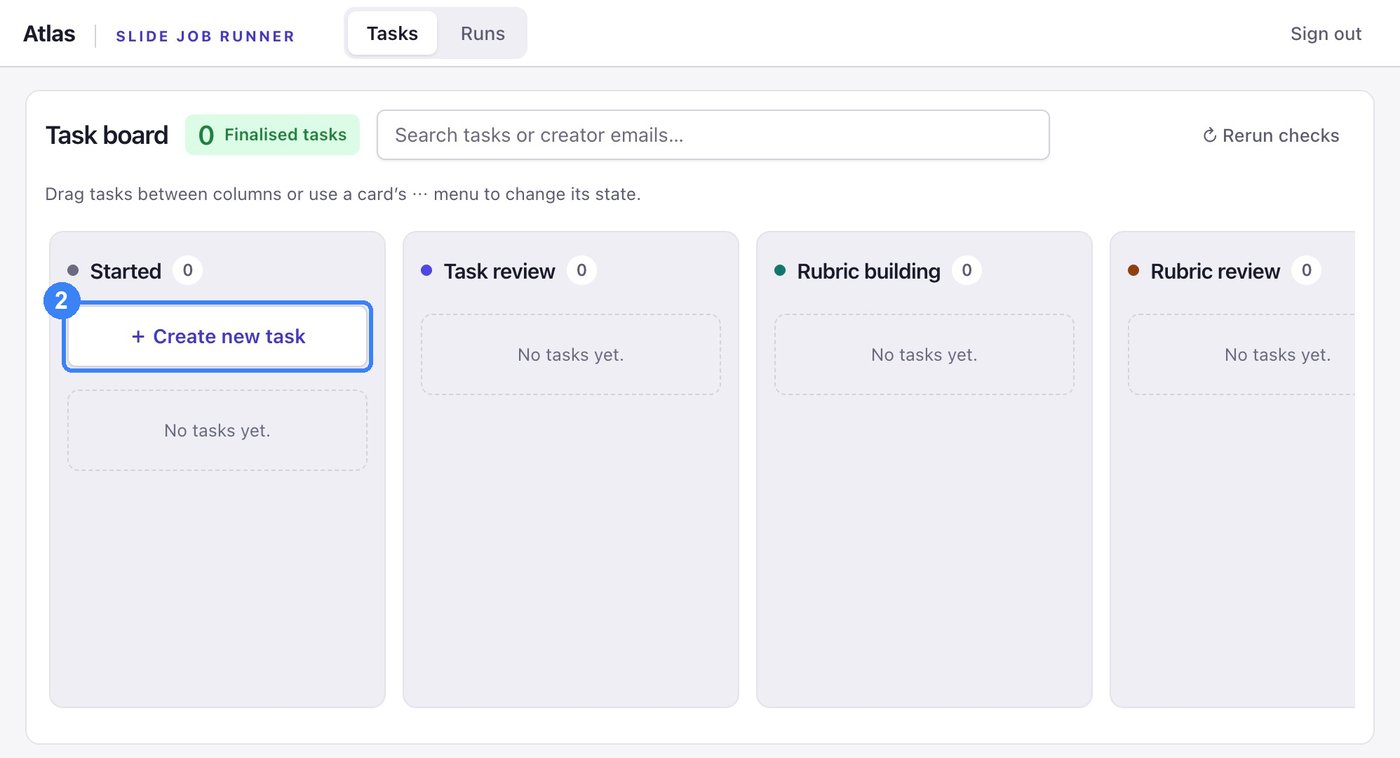
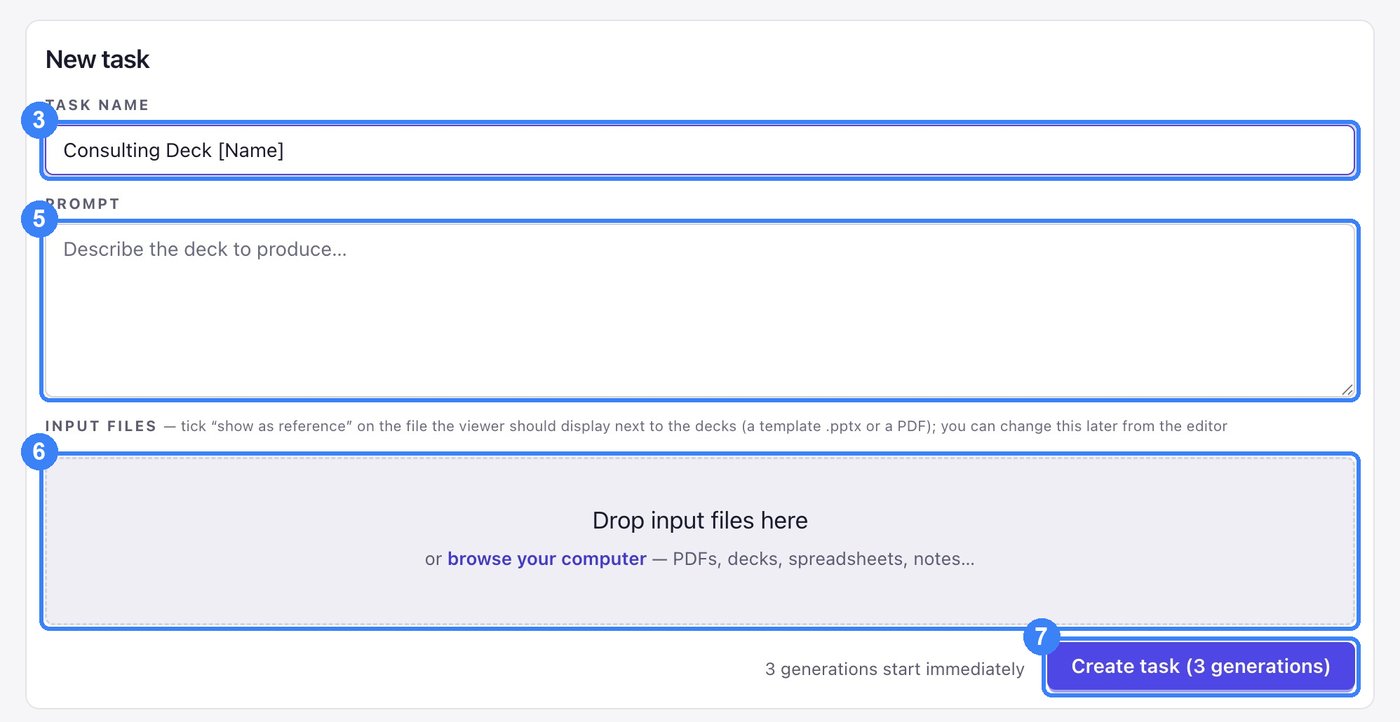
You upload the prompt, the base PowerPoint and the source files. To create a task:
- Go to atlas.apturahq.com and log in.
- On the Task board, click + Create new task.
- Click the Task name field.
- Type your task name, including your name, for example Consulting Deck [Name].
- Click the Prompt field and describe the deck to produce.
- Drop your base PowerPoint and source files into Drop input files here, or browse your computer.
- Click Create task (3 generations). Three generations start immediately, and your tasks will then show as running.
Rubrics
Rubric guide Writing Atlas Rubrics How to write criteria, with worked examples and the assessment. About 25 minutes to read.What is a rubric, and how do I write one?
A rubric is the set of pass-or-fail criteria that grades every model attempt at your task. The rubric guide covers how to write one.
Do I need to pass an assessment?
Yes. You need 20 of 24 on the guide's assessment before you start rubric building. You can retake it using the retry link.
How many criteria should I write?
20 to 30 for four or five slides, more for longer decks, with at least 15 of them Quality. See the checklist in section 9 of the guide.
What are Mixed verdicts?
Criteria the judges disagree on. Fix them or drop them before you finalize. See section 8 of the guide.
Payments
How does payment work?
Each task is paid in two phases. The 1st payment is a fixed flat fee, paid when your task is accepted. The 2nd payment is hourly, for writing the rubric.
How much is it, and how do I get paid?
Rates depend on task complexity. If you joined directly, payments are made through our payment platform: you'll receive an invite from people.mentispro to complete your onboarding there.
How is my payment scheduled?
Once your task is accepted, ask your reviewer to confirm the acceptance in the payments channel. That triggers your payment, and the amount is then credited to your people.mentispro account in the next payment cycle.
I joined through an external agency. How am I paid?
We notify your agency about the tasks you've completed. Discuss your payment terms with your agency directly.
How are rubric hours tracked, and is there a cap?
When you start writing rubrics, you are invited to Hubstaff to track your hours. Rubric time is capped at 3 hours per task.
Slack and Support
I have joined Slack. What do I do now?
Within 24 hours you get a private channel with your domain reviewer. Share your task there and work through their feedback. If the channel hasn't appeared by then, speak to Siddhi directly.
Where do I ask questions?
In Slack. Ask your reviewer, or tag Siddhi directly in the dedicated channel.
Are there any knowledge sessions?
Yes. We run onboarding sessions regularly. Watch the announcements channel in Slack for your next session.